RPM to BPM: the cadence chart
Pedal strokes per minute and beats per minute are the same number, or exactly half of it. This chart gives you both directions for every block in a ride, and the rule that decides which one you cue.
Updated 25 September 2026

The rule
Legs and music share a pulse. On a flat or a sprint, one pedal stroke lands on every beat, so the cadence in RPM equals the tempo in BPM. On a climb, the gear is heavy and the legs slow to one stroke every two beats, so the cadence is half the tempo. That is the whole conversion:
The reason this needs a chart at all is that most music worth riding to sits between 120 and 140 BPM, which is too fast to pedal 1:1 and exactly right at half-time. So the same 128 BPM track is a 64 RPM climb, and a 90 BPM track is a 90 RPM flat. The number on the readout is not the number you cue until you know which block you are in.
Cadence to tempo
Start from the RPM you want to cue and find music in either BPM column.
| Cadence | Typical block | Music at half-time | Music at 1:1 |
|---|---|---|---|
| 55 RPM | Seated climb, heavy | 110 BPM (½ time) | 55 BPM (1:1) |
| 60 RPM | Seated climb | 120 BPM (½ time) | 60 BPM (1:1) |
| 65 RPM | Standing climb | 130 BPM (½ time) | 65 BPM (1:1) |
| 70 RPM | Climb / hill sprint | 140 BPM (½ time) | 70 BPM (1:1) |
| 75 RPM | Rolling hills | 150 BPM (½ time) | 75 BPM (1:1) |
| 80 RPM | Flat road, easy | 160 BPM (½ time) | 80 BPM (1:1) |
| 85 RPM | Flat road | 170 BPM (½ time) | 85 BPM (1:1) |
| 90 RPM | Flat road, working | 180 BPM (½ time) | 90 BPM (1:1) |
| 95 RPM | Fast flat | 190 BPM (½ time) | 95 BPM (1:1) |
| 100 RPM | Sprint | 200 BPM (½ time) | 100 BPM (1:1) |
| 105 RPM | Sprint | 210 BPM (½ time) | 105 BPM (1:1) |
| 110 RPM | Max sprint | 220 BPM (½ time) | 110 BPM (1:1) |
Tempo to cadence
Start from a track you already love and find the cadence it supports.
| Tempo | Where it lives | Climb cadence | Flat / sprint cadence |
|---|---|---|---|
| 100 BPM | Recovery, cool-down | 50 (½) | 100 (1:1) |
| 110 BPM | Warm-up half-time | 55 (½) | 110 (1:1) |
| 120 BPM | Climb or fast flat | 60 (½) | 120 (1:1) — too fast for most; use ½ |
| 124 BPM | House climb | 62 (½) | — |
| 128 BPM | The house standard | 64 (½) | — |
| 130 BPM | Climb, standing | 65 (½) | — |
| 136 BPM | Heavy climb / trance | 68 (½) | — |
| 140 BPM | Hill sprint | 70 (½) | — |
| 150 BPM | Sprint (½) or DnB flat | 75 (½) | 150 ÷ 2 again = 75; cue 75 |
| 170–180 BPM | DnB · Cardio · Run | 85–90 (½) | Runners: 170–180 spm direct |
Why the octave matters more than the decimal
A track at 128 read as 64 is not a small error. It is the difference between a seated climb and a flat, between a 30-second sprint and a recovery. Every tap-tempo counter and most auto-detectors make the choice for you, silently, and they make it wrong on bass-heavy and half-time material more often than they should.
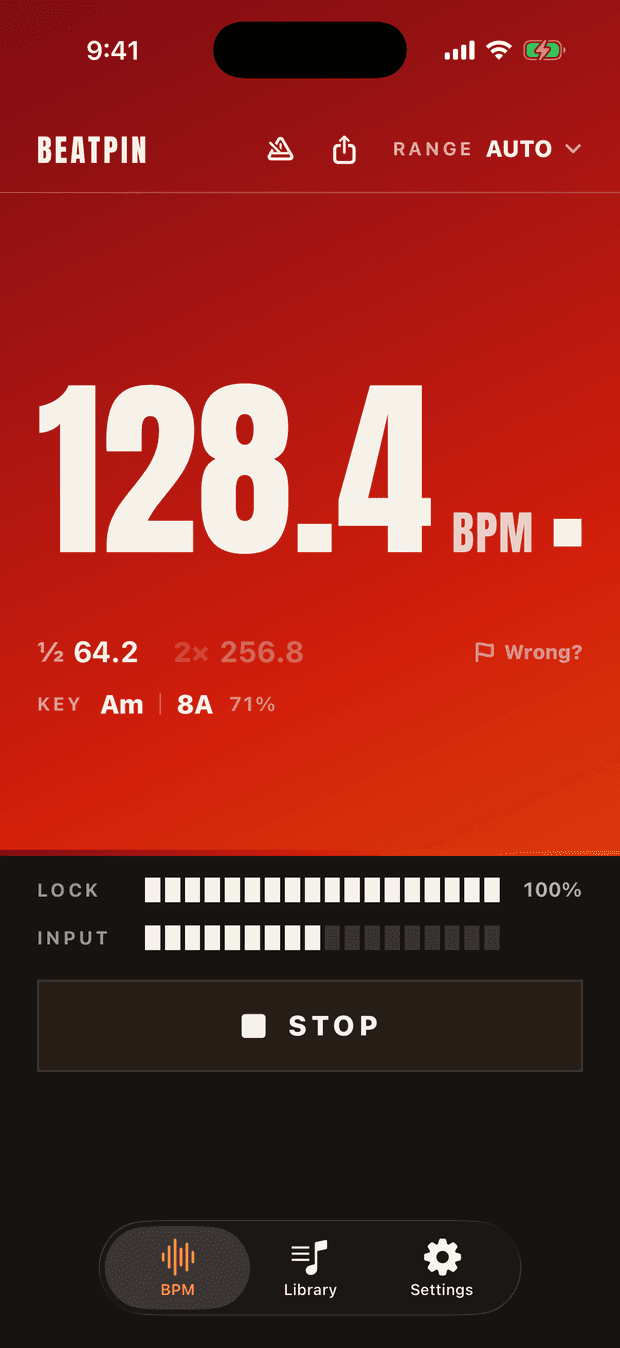
Beatpin shows the locked tempo and both of its neighbours at once, so the choice stays yours and the arithmetic is already done:
Pick the House · Techno range and the reading stays in the 86–172 window where climbs and sprints live. Pick Cardio · Run and it folds the tempo up to the movement cadence instead, which is the number runners and rhythm-ride instructors often want directly.
Building a ride on the chart
- Decide the block sequence first: warm-up, flats, climbs, sprints, recovery, peak.
- Assign each block a BPM band from the chart (climbs 124–138, flats 80–95 at 1:1, sprints 140–152 at half-time).
- Fill each band with tracks you have actually read. Streaming BPM fields are missing for many edits and wrong for live versions; a 20-second live read off a speaker settles it.
- Cue changes on count 1 of a 32-count phrase and call them on counts 5–8 of the phrase before.
We publish a worked example every week as a Tempo Sheet. The first one is a 45-minute rhythm ride.
Common questions
Is 60 RPM too slow?
Not on a climb with the gear turned up. Below 55 the stroke stops being circular and the knee takes the load, which is why most programmes floor climbs at 60. If a track pushes you under that, use its 1:1 reading and lighten the gear instead.
Why does my music service show a different BPM?
Catalogue BPMs are computed once, on the original release, often at the wrong octave. Edits, extended mixes and live versions inherit or lose them. A live read measures the audio that is actually playing.
Does this work for Zumba, HIIT and step?
Yes, the half-time rule is the same. Zumba lives at 130–150 BPM cued 1:1 on the count, step classes at 125–135, HIIT work intervals at 140–160 with recoveries at half of that.
Read the BPM off the speaker. The RPM is already there.
Point your iPhone at any track and Beatpin shows the tempo with its half and double beside it. Free, unlimited, no ads. The chart above stops being homework.