How to find BPM live—without tapping
A tap-tempo counter only measures how steadily you tap. A live BPM detector listens to the music itself, follows its repeating pulse, and waits until the evidence is strong enough to hold a number.

The quick answer
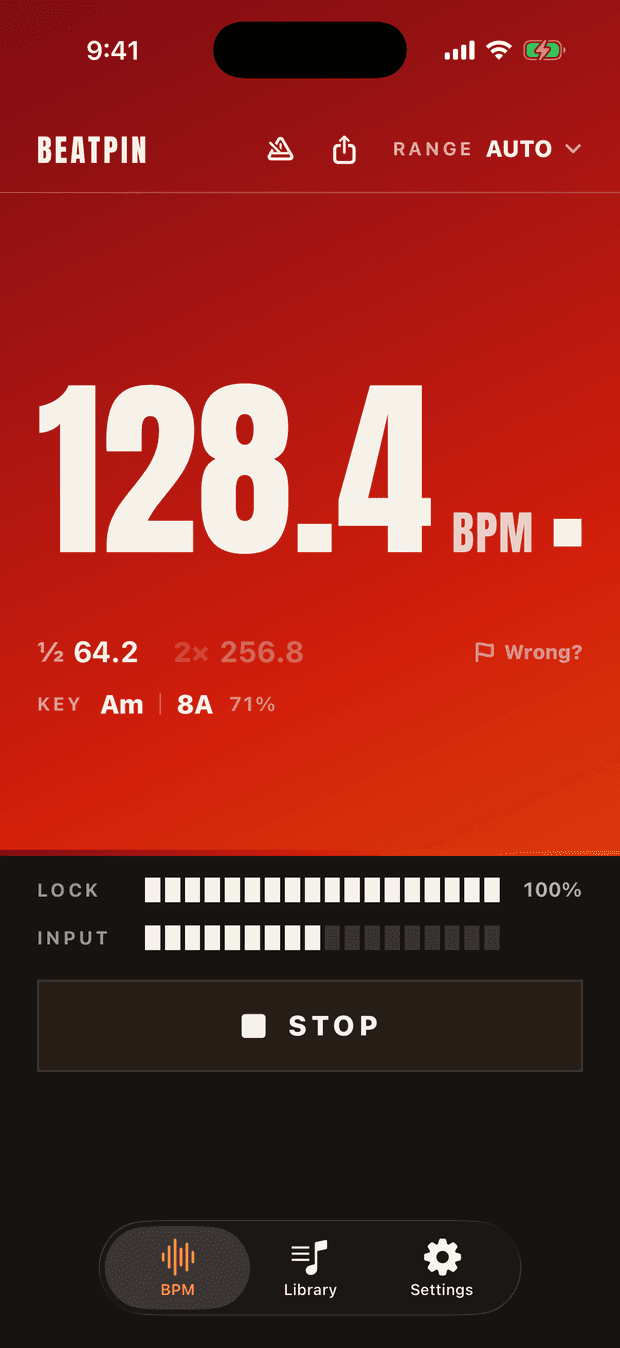
Open Beatpin, press Listen, and point the bottom of your iPhone toward the speaker. You will see a provisional estimate first, then a locked decimal BPM. If the number is exactly half or double what you expect, choose a more specific tempo range or compare the ½ and 2× alternatives beside the readout.
Do it live
Give the microphone a clean listen
Press Listen and aim the iPhone toward the nearest speaker. Do not cover the bottom microphone. Moving closer is usually more useful than turning the phone around repeatedly.
Let the provisional number settle
The first number is an informed estimate, not the final answer. Beatpin sharpens it as more beats arrive and fills the Lock meter as confidence improves.
Resolve half and double tempo
Dance music can be counted at more than one level: 65 and 130 BPM may describe the same pulse hierarchy. Check the ½ and 2× alternatives or select a range that matches the music you are hearing.
Read the lock, not only the digits
A held number with a strong Lock meter is more useful than a fast number that keeps moving. If the lock drops during a sparse breakdown, wait for the kick or percussion to return.
Why automatic detection beats tapping
Tap tempo is useful when the room is quiet and your timing is the thing being measured. It becomes awkward when you are teaching, mixing, moving, or trying to check a short section before it changes.
Automatic detection keeps your hands free and measures the audio rather than your reaction time. It is especially useful for unfamiliar edits, live sources, radio, vinyl, or music that is not available in an online BPM database.
What makes a live read harder
No microphone detector can extract a definite tempo from every moment. Sparse intros, rubato performances, quiet playback, heavy reverb, and tracks without clear percussion provide less repeating evidence.
A good detector should show that uncertainty instead of inventing precision. Beatpin may stay provisional, pause, or drop a lock until the rhythm becomes clear again.
- Move closer to the speaker when the Input meter stays low.
- Use the iPhone microphone rather than a connected headset microphone.
- Choose House · Techno, Drum & Bass, Groove · Hip-Hop, or another known range when Auto lands on the wrong octave.
- Treat every live BPM result as a strong estimate, not a certified measurement.
Common questions
Can I find BPM without knowing the song name?
Yes. Live BPM detection analyses the rhythm reaching the microphone; it does not need a title, streaming link, or database match.
Why does a 130 BPM track sometimes appear as 65?
Those are octave-related interpretations of the same pulse. Select a tempo range that includes 130 BPM or use the visible 2× alternative to move to the faster count.
Does Beatpin upload the music it hears?
No. BPM detection runs on-device. Optional song recognition sends an acoustic fingerprint to Apple's Shazam service, never raw audio to Beatpin.
Is live BPM detection free?
Beatpin's live BPM detector is free and uncapped, with no ads or account. Pro adds key detection, unlimited saved history, recordings, and a metronome.
Point. Listen. Read the tempo.
Beatpin turns your iPhone into a live tempo instrument. The core BPM detector is free, uncapped, and works on-device.