A live BPM detector for the DJ booth
Deck analysis is excellent for tracks already inside your software. Beatpin covers the other moment: audio that is playing now but is not analysed, tagged, or even on your device.

The quick answer
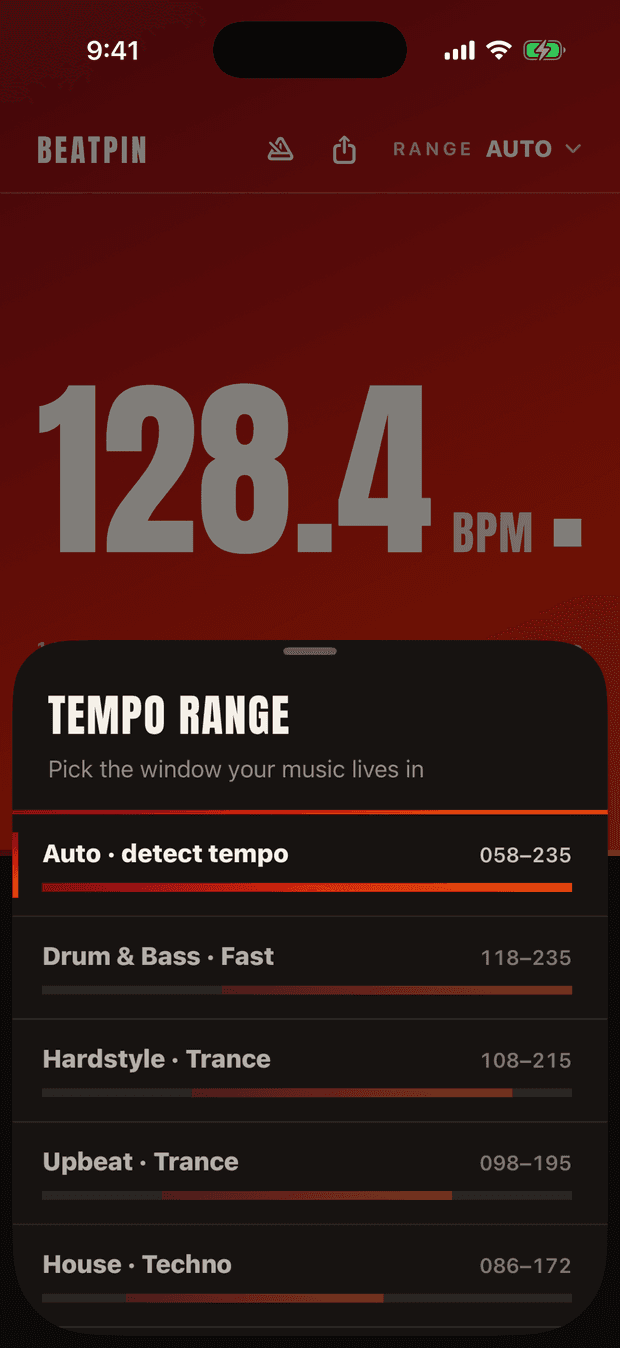
Place your iPhone where the booth monitor is clear, choose the range for the style you are hearing, and let the Lock meter settle before trusting the decimal BPM. Use the ½ and 2× alternatives to catch octave ambiguity before you make a tempo decision.
Do it live
Listen from the booth, not the crowd
Aim the iPhone toward a booth monitor or another clear source. The cleaner direct signal usually produces a faster lock than reverberant front-of-house audio.
Select the musical range
Use House · Techno, Hardstyle · Trance, Drum & Bass, or another suitable window. The range tells the detector which octave of the pulse matters for this set.
Wait for a held reading
Read the Lock meter alongside the number. A decimal BPM that has settled is suitable for a quick check; a provisional value during an intro or breakdown is not.
Sanity-check the octave
If a track feels twice as fast as the displayed number, compare the 2× value. Beatpin keeps both alternatives visible so a mathematically plausible half-time read does not become a musical mistake.
Where it fits beside DJ software
Beatpin is not trying to replace beat grids, sync, or careful track preparation. It is a second reference for sources your normal workflow cannot inspect: another DJ's outgoing track, vinyl, radio, a live edit, a white label, a phone connected to the mixer, or music already filling the room.
Because it listens through the microphone, the answer describes the signal you can actually hear. That makes it useful as a quick independent check, but it cannot see an upcoming tempo change before the room plays it.
Booth conditions that matter
Crowd noise, monitor delay, effects, and long breakdowns can all reduce confidence. A stable detector should abstain when the evidence disappears and regain the lock when the rhythmic material returns.
- Keep the microphone away from direct handling noise and do not cover the bottom edge of the phone.
- Use Dark appearance in a dim booth and keep the display angled away from distracting reflections.
- Disable optional song recognition when you want a completely offline read.
- Use the Lock Screen Live Activity when you need a glanceable number without reopening the app.
Common questions
Can it detect BPM from vinyl?
Yes, if the playing audio has a sufficiently clear repeating beat. Beatpin listens to the room, so the source does not need to be a digital file on the phone.
Will it identify unreleased edits or bootlegs?
BPM detection does not require identification and can still work. Optional Shazam recognition may not name live, unreleased, or heavily edited material.
Does it replace a beat grid?
No. It provides a live tempo estimate for what is audible now. DJ software remains better for preparing grids, cue points, and changes later in a track.
Why does the lock disappear during a breakdown?
A breakdown may remove the repeating percussion needed to support a confident tempo. Beatpin waits rather than displaying a number it cannot currently justify.
Check the track the booth is actually playing.
Use Beatpin as a live second reference for vinyl, edits, unfamiliar sources, and the outgoing track. BPM detection stays free and uncapped.